Loan walkthrough

One loan, from first application to final payout

Follow a $500,000 company loan secured over a rental property, step by step. See what your team does at each stage, what Flolend handles for you, and how the deal keeps moving after settlement.

Read it start to finish, or jump to the part of your lending day you want to make easier.

Meet the example loan

Venwick Rentals Limited wants to borrow $500,000 to buy a residential rental property in Tauranga. Its two directors, Arlo and Mia Venwick, will guarantee the loan. A credit officer prepares the deal and a lending manager signs off the decision.

The loan runs for 15 years at a fixed 10.95% a year. The first 36 monthly payments are interest only, then the loan moves to principal and interest for the remaining 144 months. The main security is a first mortgage over the property, valued at $780,000. The lender also takes a general security agreement over the company, so we can follow a PPSR financing statement from registration to discharge.

The company, people, property and figures are fictional, and the screens come from a Flolend demo organisation. This is a software walkthrough, not an offer of finance. Every lender sets its own pricing, credit policy and security requirements.

Chapter 1

Apply and check

Draft

1. Start from your loan product

Pick your property-backed product and the deal starts with your rate, term, repayment structure, fees and loan terms already in place.
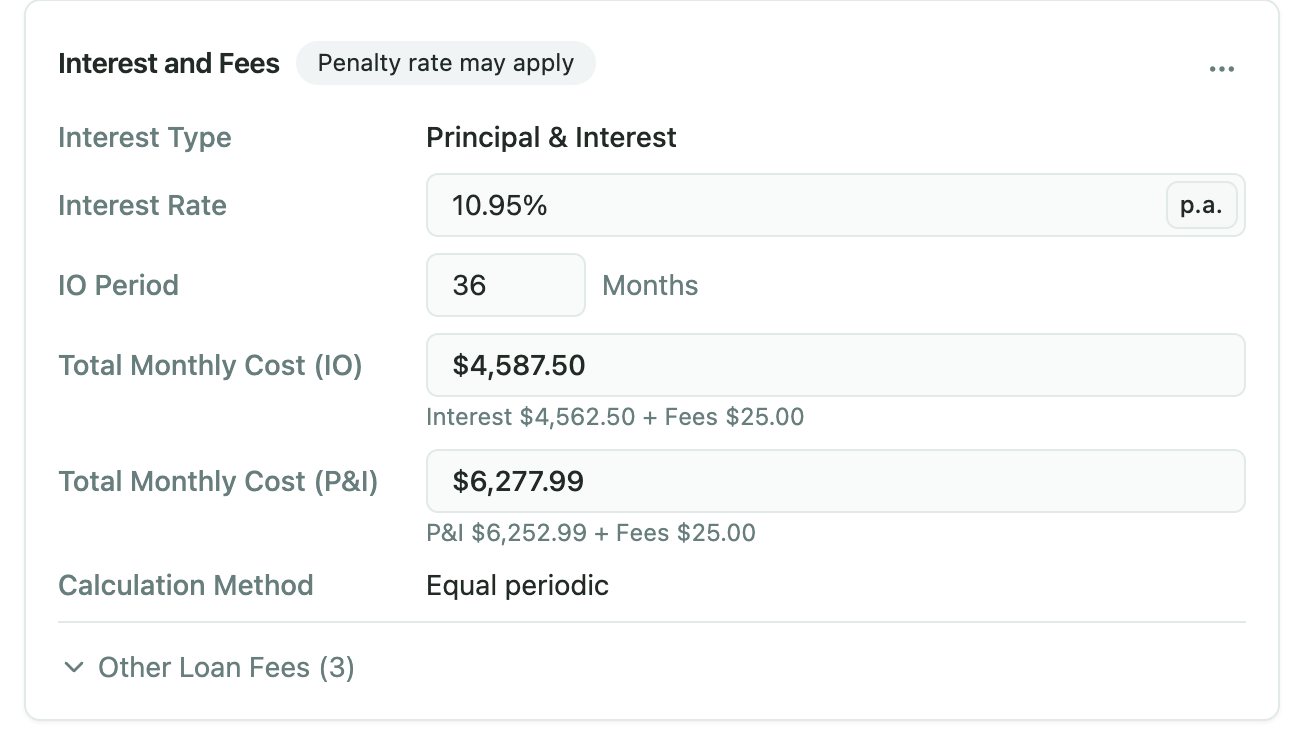
Interest and fees panel: 10.95% a year, a 36-month interest-only period, $4,587.50 a month interest only and $6,277.99 principal and interest
Rate, interest-only period and repayments, carried in from the product.
Read the detail

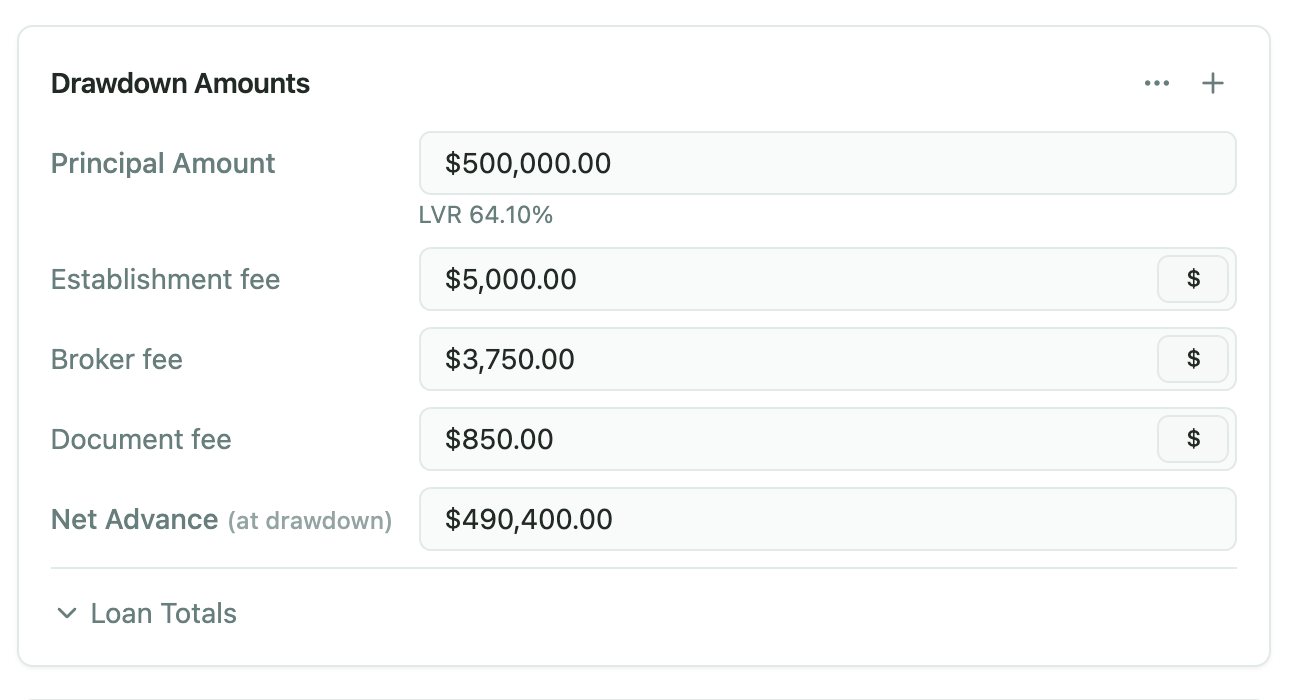
In our example, the credit officer picks the Property-backed business loan, enters $500,000 for the purchase, and the 15-year term with its 36 interest-only months fills in from the product. The establishment fee works out at $5,000 and the broker fee at $3,750. With the $850 document fee, $9,600 comes out of the advance, leaving $490,400 for settlement.

The product sets the interest type and the interest-only stage, so this loan knows from day one that it switches to principal and interest after 36 months. No variation is needed when it does.

Fees come across too, each with its own amount and timing. Here that means a 1% establishment fee and a 0.75% broker fee taken from the advance, an $850 document fee, a $25 monthly facility fee, a dishonour fee if a direct debit fails, and a discharge and security release fee charged when the loan closes. The credit officer can adjust any of them for this deal, and the product’s standard loan terms are ready for the offer.
2. Bring in the company, its people and their checks

Search the Companies Register and import the company with its directors and shareholders, instead of typing them in.

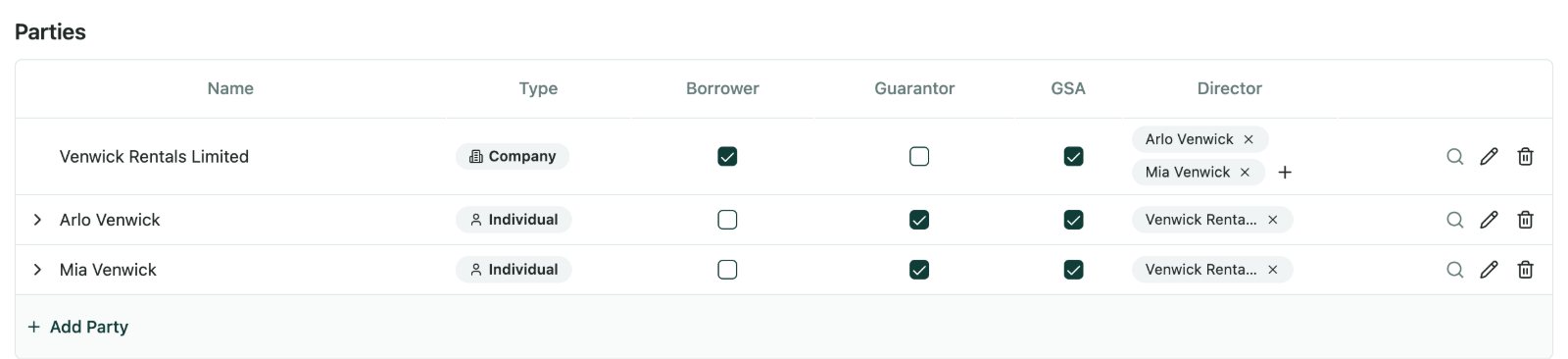
Parties table with Venwick Rentals Limited as borrower and Arlo and Mia Venwick as guarantors and directors
Who borrows, who guarantees and who signs as director.
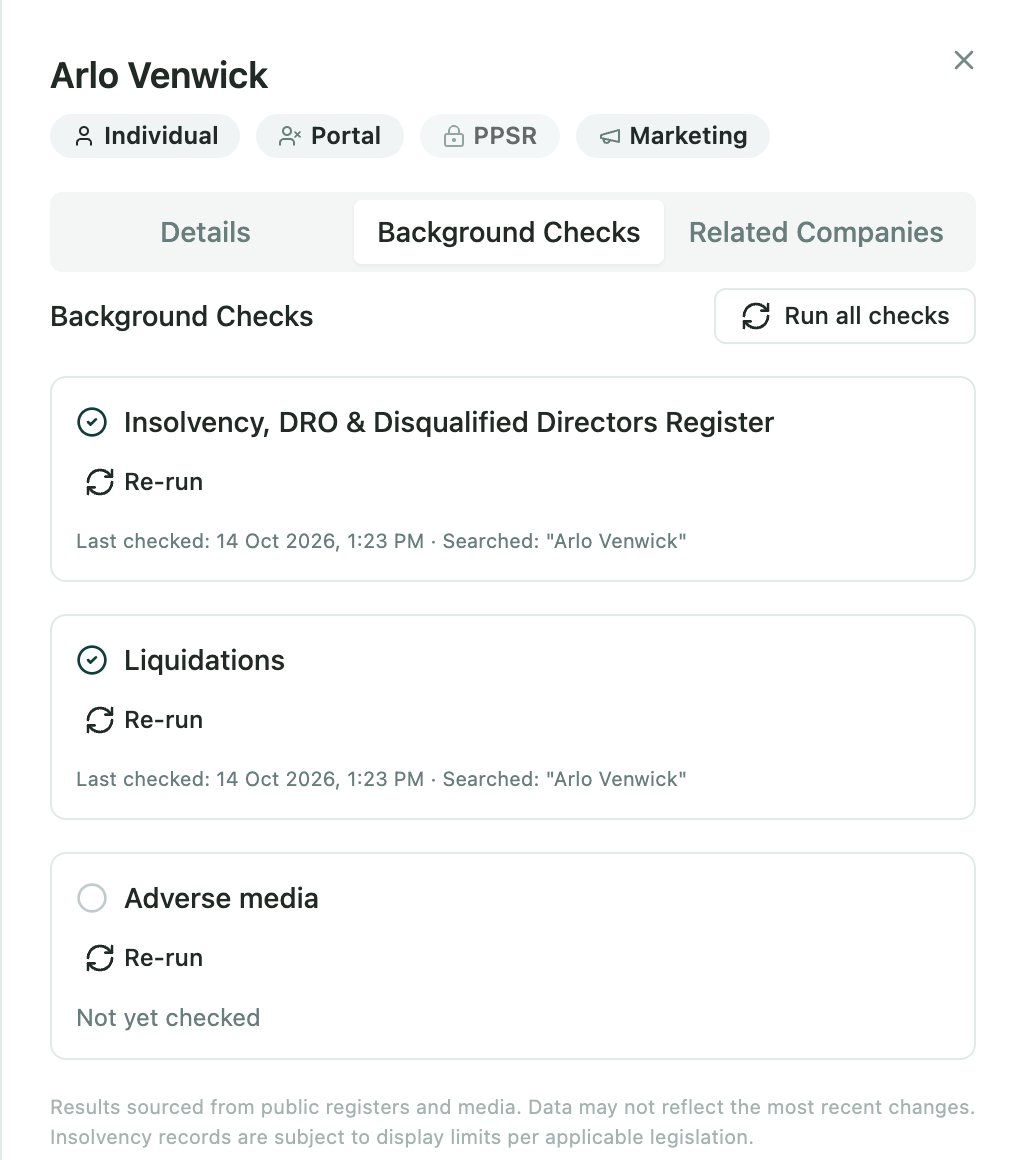
Background checks for Arlo Venwick: insolvency, DRO and disqualified directors register clear, liquidations clear
Checks run as soon as a party joins the deal.
Read the detail

In our example, the officer imports Venwick Rentals Limited with Arlo and Mia Venwick as its directors and shareholders. The company is the borrower, Arlo and Mia are guarantors, and both sign for the company as directors. Their background checks come back clear, and the results stay on each party for the lending manager to see.

For each person, choose whether to create a new contact, reuse one you already have, or skip them. Then mark who borrows, who guarantees and who signs. Directors and trustees get their signing capacity automatically, ready for the loan documents.

As soon as a party joins the deal, Flolend runs background checks in the background: the insolvency register, debt repayment orders, disqualified directors, past liquidations and related companies. An adverse media search can run too, charged per check. Results sit on each party for your team to review, and a possible match is a prompt to ask questions, not a decision.

Lending to a trust instead? Flolend records trusts, trustees, beneficiaries and signing capacities in the same way.

3. Add the property and check the title

Search LINZ for the property and bring the title, registered owners and existing interests, such as mortgages and caveats, into the deal.

Drawdown amounts: $500,000 principal at a 64.10% LVR against the $780,000 property, establishment, broker and document fees, and a $490,400 net advance
Loan-to-value against the $780,000 valuation, with the fees and net advance.
Read the detail

In our example, the company is buying 8 Marrowgate Lane in Tauranga from a private vendor. A registered valuer puts the property at $780,000, so the new first mortgage sits at about 64% of its value. The vendor stays off the loan, and Venwick Rentals Limited becomes the owner once the purchase settles.

Registered owners can be added to the deal automatically, and Flolend asks before reusing a contact you already hold. For a purchase, the current owner is usually the vendor, so the team keeps them separate from the buyer and the guarantors.

The credit officer then records the valuation, the ranking of the new mortgage and any lender ahead of it. Viewing owner names and memorials is a permission you control, so only the right people see that detail.

5. Search the PPSR

Run a PPSR search from the company’s record, check the search criteria, then confirm. The result is saved with the party for anyone reviewing the deal later.

Read the detail

Here, a financing statement shows another lender holds security over the company’s assets. The credit officer asks about it, confirms an equipment loan that wasn’t disclosed, and updates the servicing picture.

If a lender already has a registration it wants to manage in Flolend, it can link the existing financing statement instead of registering a new one.

Chapter 2

Assess and offer

Offer sent

6. Assess the deal against your credit rules

Your credit policy lives in Flolend as rules and a checklist. Each item can block or warn, and can be required before the offer or before the signed offer.

Read the detail

In our example, the checklist confirms the loan-to-value is under the lender’s limit, asks for a rental appraisal and each guarantor’s statement of position, and warns that the undisclosed equipment loan needs an updated servicing assessment. The assistant reads the bank statements and rental appraisal, records the company’s income and outgoings, and shows the surplus after the new loan for the officer to check.

The checklist pulls in what the deal already knows, such as loan-to-value, ranking and party roles, and flags what still needs an answer. Staff can acknowledge a warning and move on, while a blocking item has to be resolved first.

A connected AI assistant can help with the groundwork. It can test the deal against your rules, read uploaded documents and record a servicing assessment with income, costs and surplus. It works within the same rules your team does and can never step past the checklist.

7. Bring the lending manager in

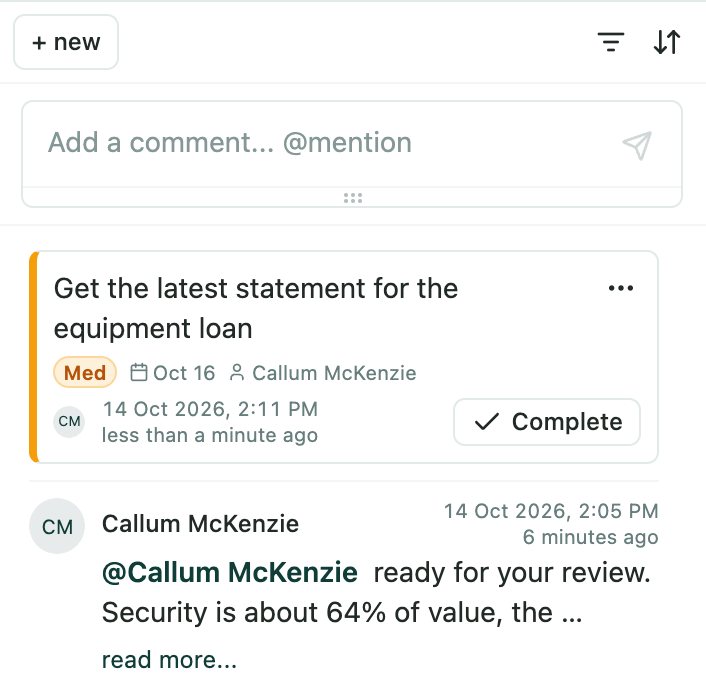
The credit officer @mentions the lending manager on the deal, and they see it straight away in Flolend.

Deal activity feed with a task to get the equipment loan statement and a comment mentioning the lending manager
A mention and a task, on the deal itself.
Read the detail

In our example, the credit officer tags the lending manager with a short summary: strong security at about 64% of value, an equipment loan that has now been explained, and servicing confirmed. The manager asks for the latest equipment loan statement as a task due on Friday. When it arrives, they approve the deal for an offer.

Comments, documents, checks and changes sit together on the deal’s activity feed, so the manager reviews the whole story in one place instead of chasing emails. Follow-ups become tasks with an owner and a due date, and everyone’s open and overdue tasks are easy to see.

Once the manager is comfortable, the deal moves on to the offer.

8. Create and send the loan offer

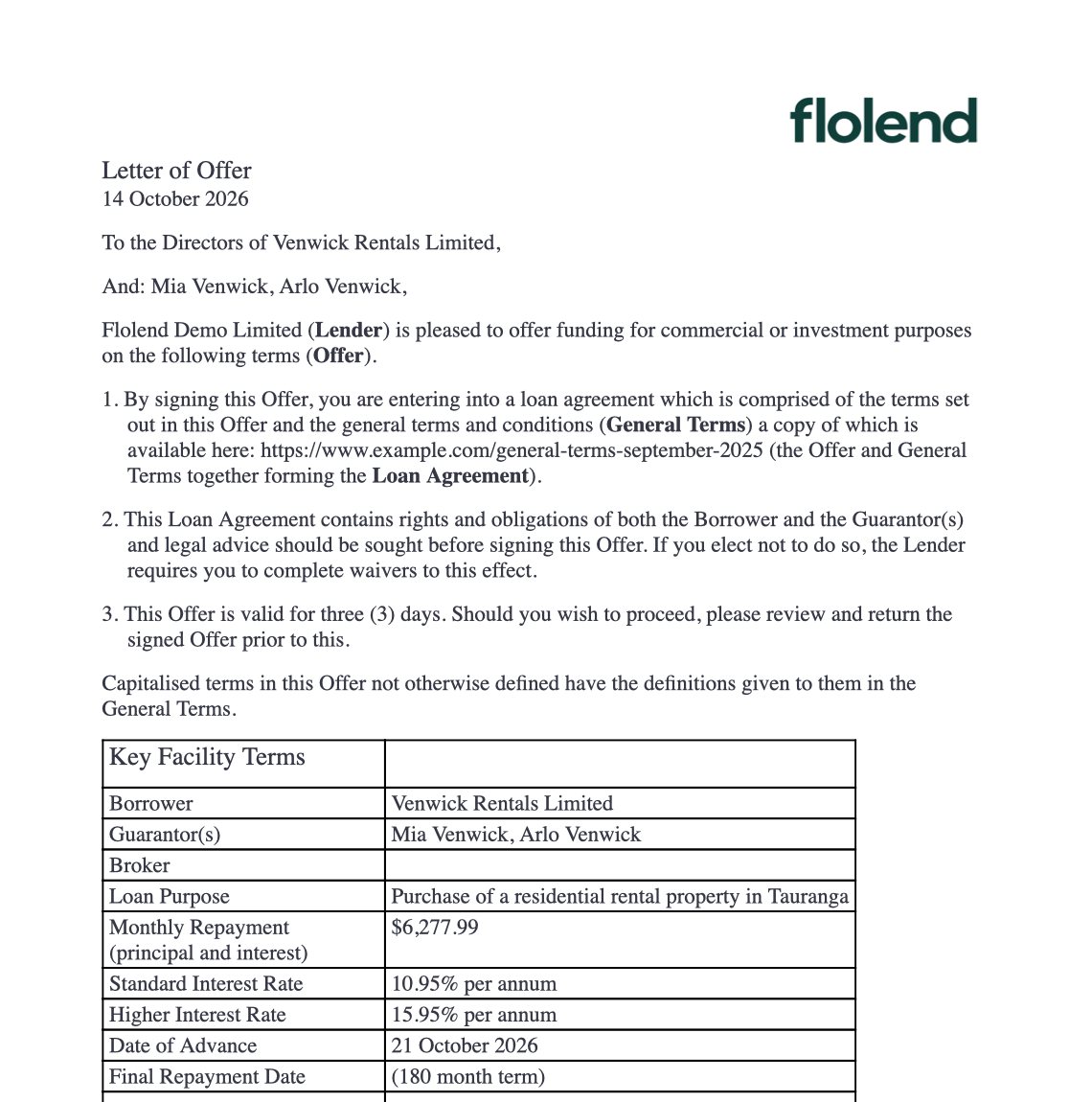
Generate the letter of offer from your own Word template, filled with the loan figures, fees, parties, signing capacities and your standard terms.

First page of the generated letter of offer for Venwick Rentals Limited, showing a $500,000 principal, fees and a net advance of $490,400
The offer, generated from the lender's own Word template.
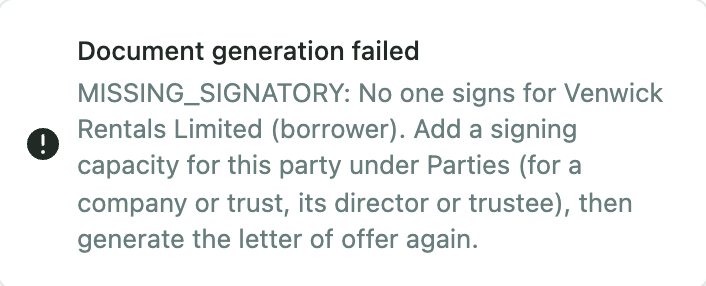
Message saying the letter of offer could not be generated because no one signs for Venwick Rentals Limited
Flolend refuses an offer with no signatory for the company.
Read the detail

In our example, the offer names Venwick Rentals Limited as borrower and Arlo and Mia as guarantors, both signing as directors. It sets out the $500,000 advance, each fee, the interest-only and principal and interest stages, and standard terms such as insurance, identity checks and the signed sale and purchase agreement.

Flolend checks the deal before it creates the offer, including the credit checklist items that must be complete first. It also catches details that would make a document wrong, such as a missing signatory.

Email the offer from the deal, then upload the signed copy when it comes back. Confirming the deal records the signed offer and moves the loan to approved, ready for settlement.

Chapter 3

Settle

Approved

9. Work through the drawdown conditions

When the deal is confirmed, your standard drawdown conditions are added from the product, with any that don’t apply left out.

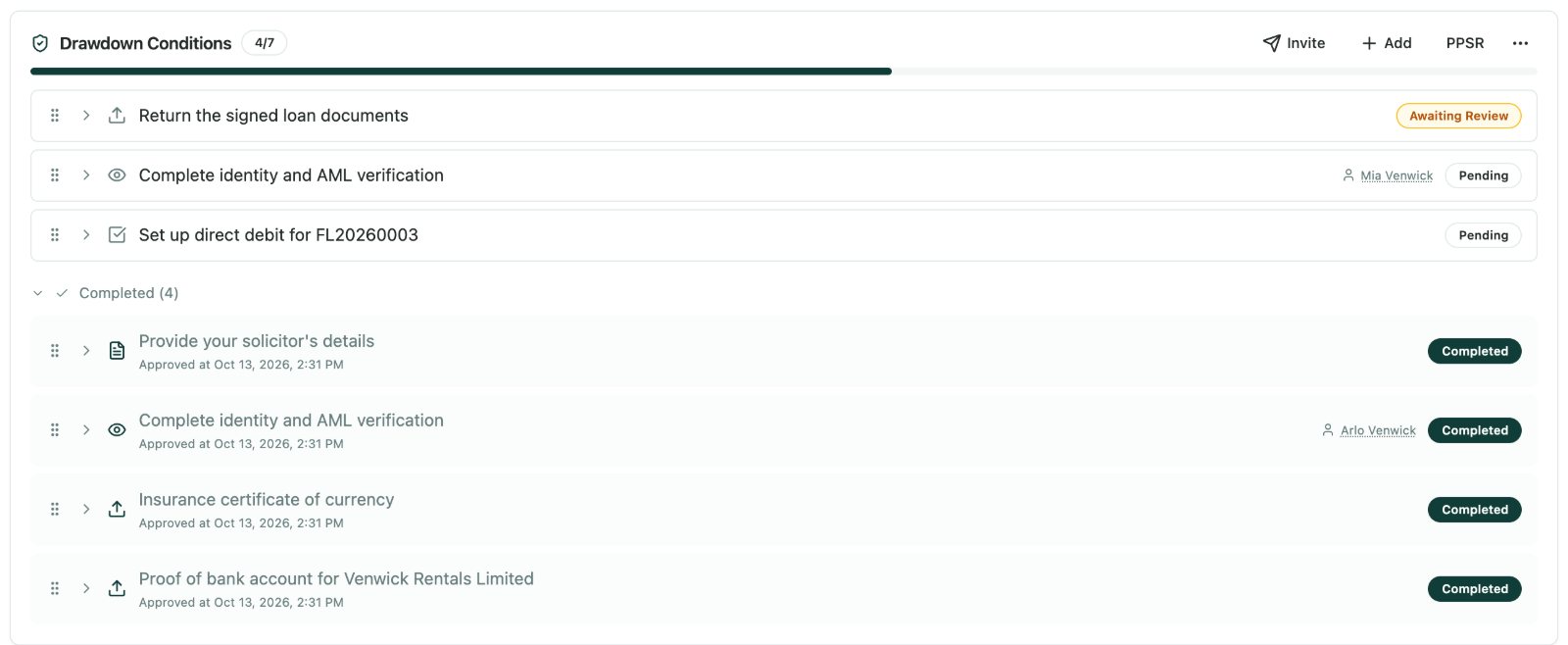
Drawdown conditions at 4 of 7 complete: signed loan documents awaiting review, Mia Venwick's AML verification and the direct debit pending
Conditions from the product, tracked to completion.
Read the detail

In our example, Venwick Rentals is asked to name its solicitor, then return the signed loan document pack: the mortgage, Arlo and Mia’s guarantees and the general security agreement, signed with that solicitor. It also uploads the insurance certificate naming the lender and proof of the bank account for the advance, and sets up the direct debit. Arlo and Mia each complete identity and AML verification with the lender’s AML provider, and the broker supplies their invoice for the $3,750 broker fee.

Each condition knows how it gets completed. Some need a document upload, some a form or an acknowledgement, some a direct debit mandate, and some a check by your team. Conditions can be shared with the borrower and broker in their portals or kept for staff only.

Borrowers upload documents and set up their direct debit in the borrower portal. Brokers follow progress and supply their invoice in the broker portal. Watchers get an email when a condition changes or someone comments, so nothing stalls quietly.

10. Register security and settle

Once every condition is complete or waived, the Confirm Drawdown wizard takes the loan to settlement.

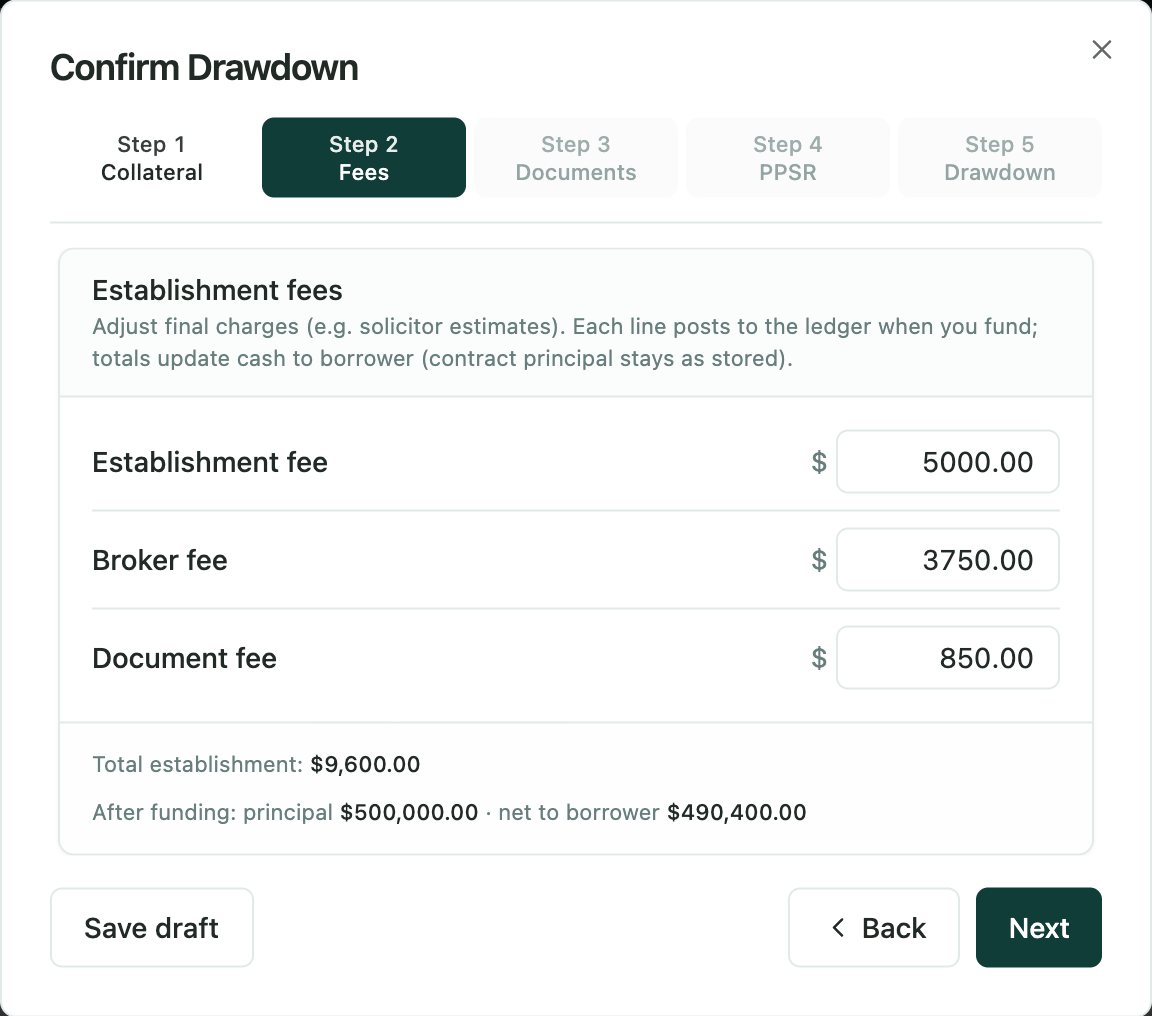
Confirm Drawdown wizard fees step: establishment $5,000, broker $3,750 and document $850, net to borrower $490,400
Fees confirmed and the net advance shown before funding.
Read the detail

In our example, the wizard shows the $500,000 loan, $9,600 of fees taken from the advance, and $490,400 going to the borrower’s solicitor for settlement. The PPSR registration covers the company’s present and after-acquired personal property under the general security agreement.

It walks through the collateral, the fees and how each one is treated, so the net advance is clear before any money moves. It then collects the settlement statement and bank documents, and covers the PPSR registration.

The PPSR registration is lodged from Flolend, with its registration number, expiry date and collateral saved against the loan. Enter the date of advance, and the loan becomes active with its repayment schedule in place.

Chapter 4

Manage and close

Active

11. Collect repayments by direct debit

With a GoCardless mandate in place, Flolend collects each repayment by direct debit, based on what the loan schedule says is due.

Upcoming payments list showing the next direct debit for Venwick Rentals Limited of $9,267.26 due 9 November 2026
Upcoming collections, with what each one covers.
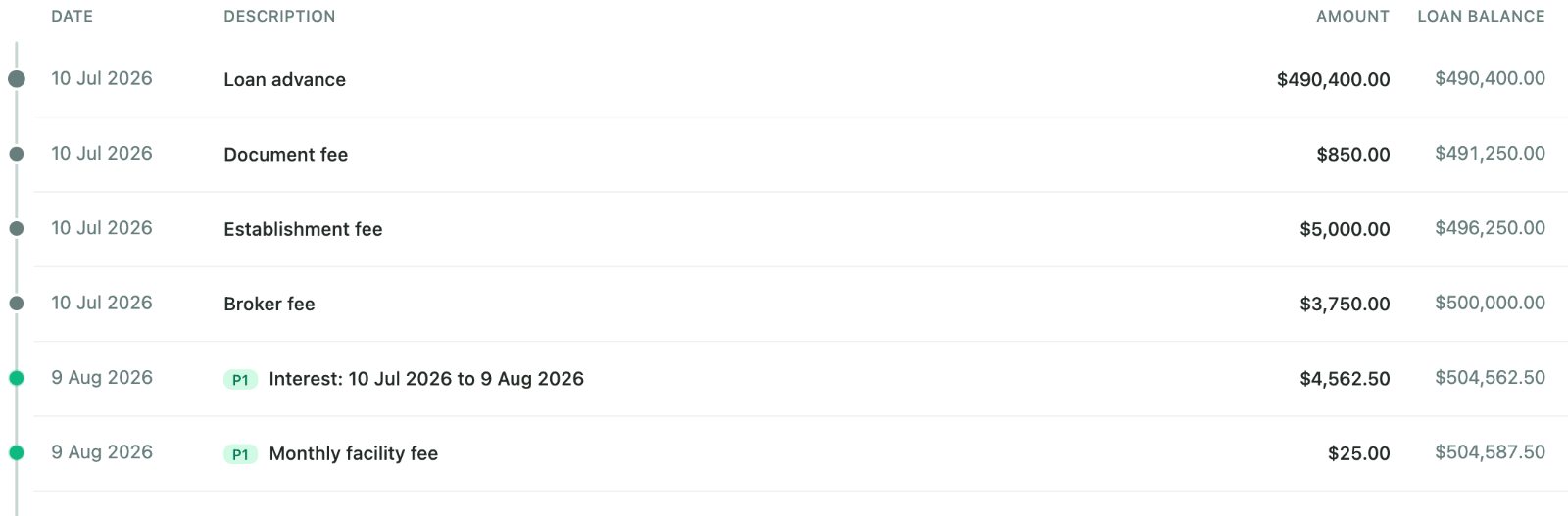
Loan ledger showing the advance, establishment, broker and document fees, then monthly interest of $4,562.50 and a $25 facility fee
Each month's interest and fees post to the loan automatically.
Read the detail

In our example, Venwick Rentals pays about $4,563 a month for the first 36 months, plus the $25 facility fee, all collected by direct debit on the same day each month.

Collections can run automatically, or wait for a team member to approve them first. Staff can also change an amount or date, or reject a collection, before it goes out.

When a payment clears, it’s posted to the loan for you. If a debit fails, Flolend records the failure, charges the dishonour fee set on the loan and flags the loan for follow-up.

12. Handle a missed payment

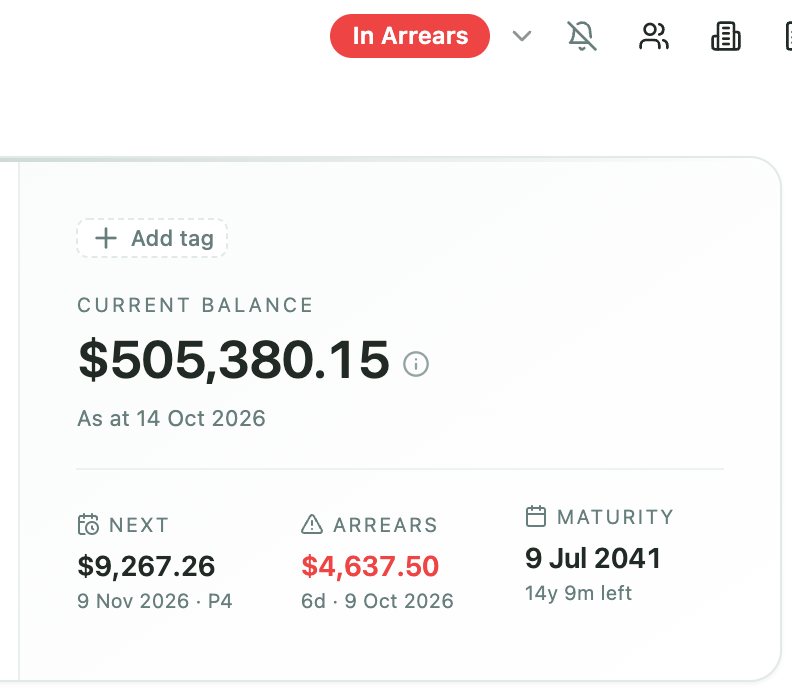
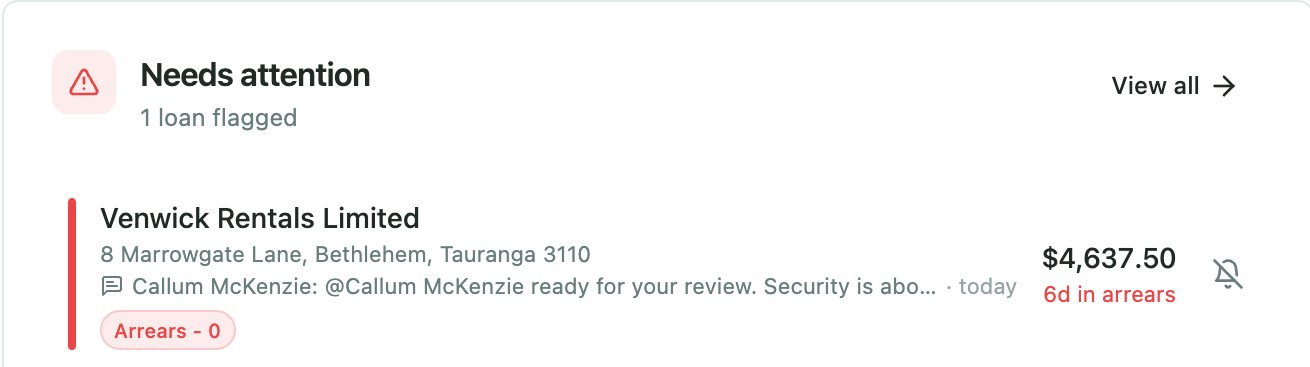
A missed payment moves the loan into arrears and onto your Needs attention list, and Flolend starts your arrears follow-up.

Loan summary showing a $505,380.15 balance, the next payment of $9,267.26 and $4,637.50 in arrears for 6 days
Arrears show on the loan as soon as a payment is missed.
Needs attention list with Venwick Rentals Limited 6 days in arrears for $4,637.50
And on the team's Needs attention list.
Read the detail

In our example, an October direct debit fails because the company has changed bank accounts. Flolend charges the $50 dishonour fee and sends the first reminder. Arlo calls the next morning with the new bank details. The team sets up a new direct debit and pauses the follow-ups for a week while it goes through.

The first message can go straight away by email or text, and the follow-ups on later days are drafted in your outbox for the team to check and send. Every message uses the loan’s current figures, so the borrower sees the right amount.

If the borrower calls with a plan, staff can pause the follow-ups on that loan until a chosen date, with a note explaining why. Every message sent is recorded on the loan.

13. Answer questions, send statements and move to principal and interest

A borrower asks for a statement. Generate one for any date range from your own statement template and send it from the deal.

Read the detail

In our example, Mia asks for a statement for the company’s accountant at the end of the financial year, and it goes out the same day. At month 37, repayments rise to about $6,250 a month as the loan starts paying down principal.

A connected AI assistant can draft replies to everyday questions using the loan’s records, ready for your team to check before anything is sent.

After 36 months, the loan moves from interest only to principal and interest on its own, because the product set it up that way. If the borrower later needs a change, such as a new rate or term, the variation flow previews the new schedule and prepares the variation document and invoice from your templates.

14. Keep the PPSR registration current

If the collateral changes, amend the financing statement from Flolend. As expiry approaches, renew it within the renewal window.

Read the detail

In our example, PPSR financing statements last five years, so the Venwick Rentals registration comes up for renewal well before the loan ends. Flolend flags it ahead of expiry, and the team renews it without leaving the loan.

You can renew one registration or several at once, or set your organisation to renew automatically before registrations expire. Each financing statement shows its status, so the team can see at a glance what needs attention.

15. Pay out, release and close

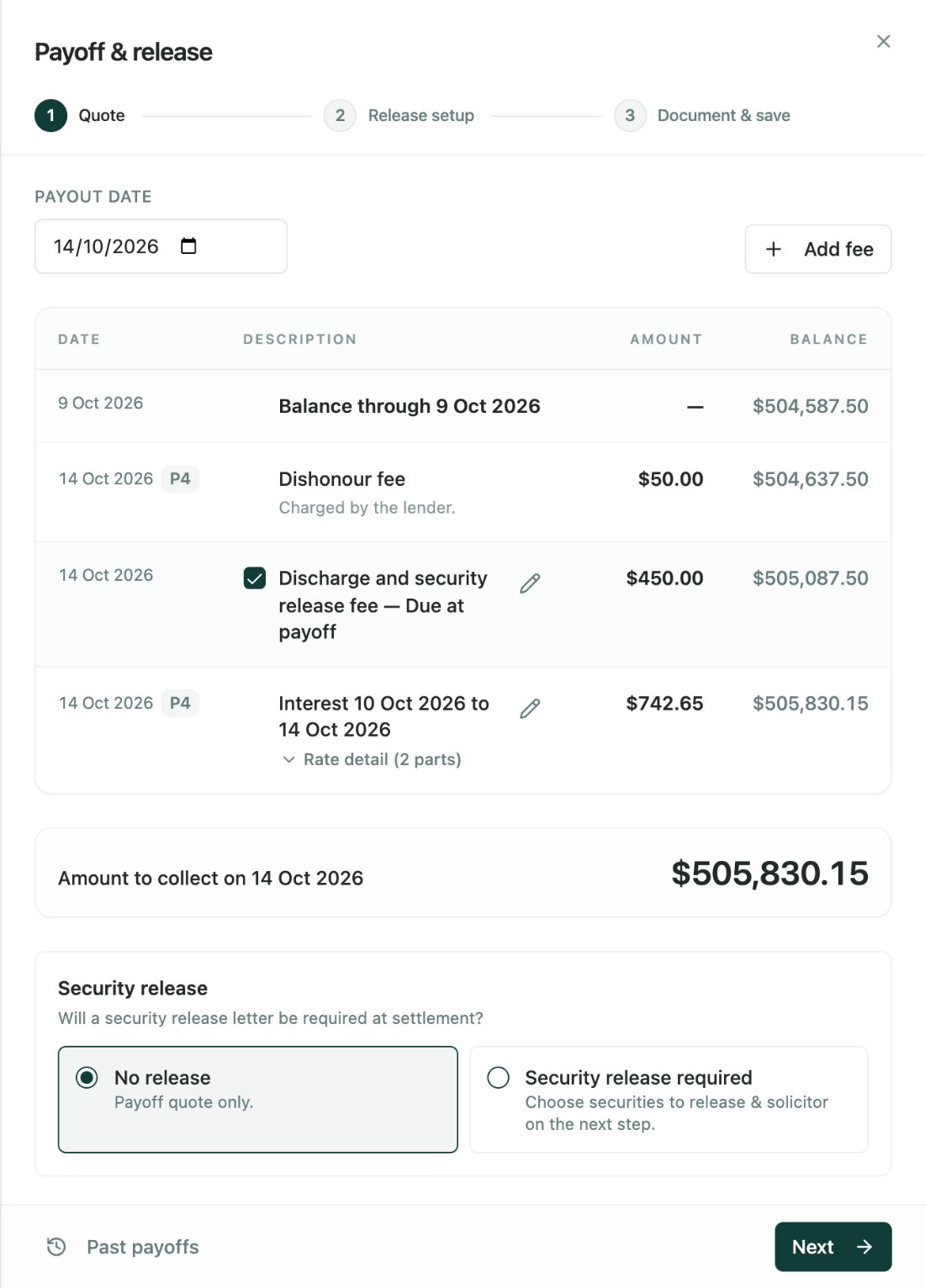
Years later, the borrower sells the property. Pick the payout date and Flolend calculates the payout figure, including interest to that date and the fees that apply when the loan closes.

Payoff and release calculator showing interest to the payout date, a dishonour fee, the $450 discharge and security release fee and the amount to collect
The payout figure, with interest and closing fees, before the release documents.
Read the detail

In our example, Venwick Rentals later sells the property. The payout figure includes interest to the settlement date and the $450 discharge and security release fee, and the borrower’s solicitor receives the payout quote and release documents before settlement.

The calculator warns you about any direct debit still in progress, so the borrower isn’t charged twice. Generate the payout quote and security release documents from your templates and send them to the borrower’s solicitor.

When the funds arrive, the five-step close wizard confirms the payment, discharges the PPSR registration, releases the securities, produces the final statement and closes the loan. Discharging the PPSR does not itself discharge a land mortgage, so the mortgage discharge is completed through the usual conveyancing process.

Frequently asked questions

What checks does Flolend run on a company borrower?

When a party joins a deal, Flolend checks the insolvency register, debt repayment orders, disqualified directors, past liquidations and related companies. An adverse media search can also run, charged per check. Company details, directors and shareholders come from the Companies Register.

Can a loan start interest only and switch to principal and interest?

Yes. Set the interest-only stage on the product or the loan, for example 36 months of a 180-month term. The loan switches to principal and interest automatically when that stage ends, with no variation needed.

Does Flolend register and discharge PPSR financing statements?

Yes. Flolend searches the PPSR, registers, amends, renews and discharges financing statements, and can link registrations you already hold. Renewals can run automatically before expiry.

How does Flolend handle a missed direct debit?

A failed debit is recorded on the loan, the dishonour fee is charged and the loan moves into arrears. Flolend then follows your arrears process by email and text, with later messages drafted for your team to check and send.

See your lending process in Flolend

Tell us how a typical deal runs for your team. We’ll walk you through it in Flolend, from the first application to the final payout.